Tuesday, June 7, 2022

Optimize your cloud with Azure well-architected framework, Azure advisor and Advisor score

In this article I'll introduce Well-architected framework, Azure advisor and Advisor score. More importantly I'll illustrate how they are interconnected and how can we use them together to achieve cloud excellence.

Azure well-architected framework

Microsoft Azure has a large collection of features categorized into IaaS, PaaS and SaaS. It is very difficult for us to gain expertise on each workload. 

As a solution, Microsoft has introduced the well-architected framework which guides us on implementing Azure services with best practices. Furthermore, it assists us on operating and governing services those are already implemented in our tenant.

The Well-architected framework is built with five pillars. When implementing or operating Azure services we should always consult following pillars. The detailed documentation is available here

1. Cost optimization

Most of the cloud offerings are delivered as pay-as-you-go modal. So we need to be very careful on picking right workloads as you need to select the most cost effective solution. Furthermore when and where to use our resources. Some guidelines are given below

  • Pick correct resources
  • Setup budgets and cost constraints (limits)
  • Allocate and deallocate resources when necessary
  • Continuously monitor resources
  • Optimize or scale based on usage


2. Performance efficiency

This is discusses how can your workloads meet varying demands in an efficient way. You should consider about

  • Design patterns (e.g. CQRS, Event Sourcing, Sharding, etc..)
  • Best practices (Autoscaling, Background Jobs, Caching, CDN, Data partitioning)

3. Reliability

Reliability is where the cloud platform assists to minimize the impact of failing resources. Following are the guidelines to optimize the reliability
  • Design your landing zones/resources for failure
  • Design for self-healing
  • Design for scale-out
  • Continuously monitor application health
  • Design patterns for resiliency 
  • Best practices

4. Security

Your workloads need to be secured. Following guideline will help to improve the security
  • What identity to use to protect your resources
  • Application security
  • Data sovereignty and encryption

5. Operational excellence

This discusses the best practices to run your resources in production. 
  • Usage of patterns ( e.g. Ambassador, Anti-Corruption layer etc..)
  • Continuously monitor health
  • Continuously monitor availability
  • Continuously monitor performance
  • Continuously monitor security
  • Continuously monitor SLA
  • Continuously monitor usage and audit


Azure advisor

Azure advisor is your personal assistant in the cloud.
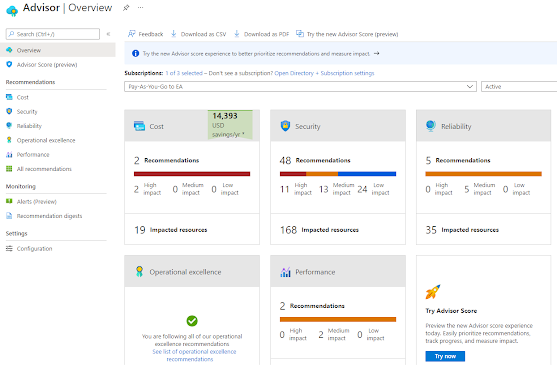


It provides you with recommendations and corrective actions improve your cloud workloads. It provides feedback on following areas

  • Cost
  • Security
  • Reliability
  • Operational excellence
  • Performance
Those are the exact pillars in Well-Architected framework!! 

In order to comply with the well-architected framework for provisioned resources, we need to keep an eye on the Azure advisor. That's it. 

Azure advisor will showcase scanned results of your workloads and some recommendations can be adopted straightaway with a single click


Advisor score

Azure advisor score is the consolidated figure calculated based on your progress towards achieving the excellence in your cloud.
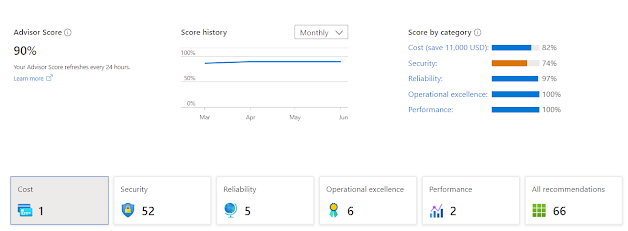


You can have the current score as the baseline and set an improved figure as the target. Then you can follow recommended actions to achieve the target score,


Summary

Well-architected framework is a great tool to achieve the excellence in Azure cloud. You don't need to reinvent the wheel. 

You can use Azure advisor and advisor score to keep your tenant complied with the well-architected framework.

Wednesday, May 18, 2022

CAF - Azure Landing Zones to build the foundation architecture for your cloud workloads

Cloud Adoption Framework (CAF) guides you to implement your cloud workloads in Azure with best practices. We encounter the concept of Landing Zones at the latter part of CAF.

I will briefly describe the concept of Landing Zones in this article. You can access the official documentation via this link

Landing Zones

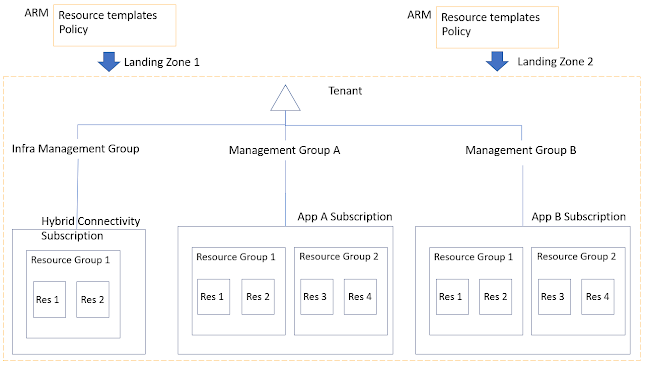
Landing Zones allow us to implement resources within subscriptions declaratively. It will commission the foundation of our cloud tenant with best practices and guidelines.

Why do we need landing zones? What is the problem with GUI/Wizard based provisioning via the beloved portal?

Landing zones are built with code to provision workloads in our tenant. Since it is written in code, we can version our cloud infrastructure in a source code repository. As we have the code, we can scale our cloud environment as we wish and we can repeatedly execute this in many environments.

Furthermore, landing zones are built in declarative manner where our resources are idempotent. Landing zones are structured in a modular manner where we can execute another landing zone in our environment on top of an existing zone.

Following are the key takeaways :)

  • Version control
  • Scalable
  • Repeatable
  • Declarative
  • Idempotent
  • Modular

There are mainly two ways that we can implement the our landing zones

1. Small Scale (Forever small or starting small)

Let's assume that we have only a single subscription or we want to start very small and gradually progress to enterprise level. Then the small scale landing zone model would be the preferred design choice.

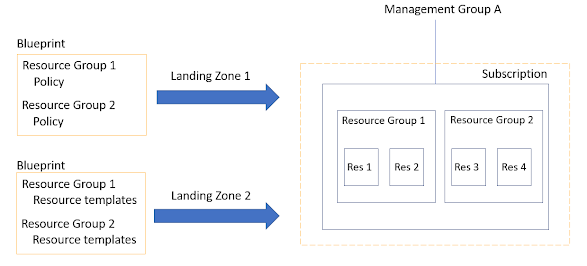
We can develop small scale landing zone with ARM templates, Azure Policy and Azure Blueprint.


Azure provides kick-start packages where we can start our small scale landing zone journey.  

Since landing zones are modular in nature, we can first apply the foundation blueprint and later add the migration blueprint to the same subscription.


2. Enterprise Scale

This is where you design and build your tenant at enterprise level. The tenant might contain multiple subscriptions with their own dedicated workloads.

Why do we need multiple subscriptions in my tenant? can't I use a single subscription to house all my workloads?

Yes you can. But that's not the best practice. The idea is to separate and contain interests within specific boundaries. 

For an example you can have a subscription to contain specific application and relevant components. You can secure and govern it with firewalls and policies. You should not mix this with unrelated Virtual Machine workloads that cater a separate business function. Ideally those workloads should reside in a separate subscription.

We can develop enterprise scale landing zones with ARM templates and Azure policies.


Azure provides following kick-start packages for enterprise

Instead of above you can deploy landing zones with Terraform. (Applicable for small scale as well as enterprise scale)

Thursday, March 31, 2022

Presentation - Building data solutions with Microsoft Azure

Recently I did a session on building data solutions with Microsoft Azure for the students of Faculty of Technology, University of Ruhuna.

This is a continuation of my previous session.

Saturday, March 12, 2022

Presentation - Real-time communication with Azure SignalR and Azure Functions - Azure Serverless Saturday

I did a session on Real-time communication with Azure SignalR and Azure Functions at Azure Serverless Saturday organized by Kovai.co and Techmeet360.

Following is the video of online event


Repos of the demos

Friday, March 11, 2022

How to present real-time IOT telemetry data with IOT Hub, Azure Functions and Azure SignalR

IOT is very common these days. We can solve many business problems with IOT and related tooling. 

How we can easily listen to live telemetry feed and present a real-time dashboard?

In this article I will show, how we can achieve it with Azure IOT Hub, Azure Functions and Azure SignalR

I will use an existing setup I used in this example I wrote previously. I have used Raspberry Pi Azure IoT Online Simulator to simulate as an IOT device and connected it to my IOT hub. Let's start from there.


I will break this exercise into three parts

  1. Create Azure Function with IOT Hub trigger
  2. Integrate Azure SignalR to the Azure Function
  3. Consume real-time data in a client application and plot data in a graph 

01. Azure Function with IOT Hub trigger

Step 01: Create a Function App


Step 02:  Select IOT Hub as the trigger


Step 03: Navigate to IOT Hub and locate the ConnectionString. Specify the ConnectionString in local.settings.json file


Step 04: Change the function

[FunctionName("GetIoTEventData")]
public static async Task Run( [IoTHubTrigger("messages/events", Connection = "ConnectionString")]EventData message, ILogger log) { log.LogInformation($"C# IoT Hub trigger function processed a message: {Encoding.UTF8.GetString(message.Body.Array)}"); }


Step 05: Let's try out by running the function locally and starting the raspberry Pi simulator


I can see the function is executed when telemetry generated


Great! now the first part of our exercise is completed!

02. Integrate Azure SignalR to the Azure Function

Step 01: Create Azure SignalR service


Step 02: Get SignalR ConnectionString and update it in local.settings.json file


{
  "IsEncrypted": false,
  "Values": {
    "AzureWebJobsStorage": "",
    "FUNCTIONS_WORKER_RUNTIME": "dotnet",
    "ConnectionString":"",
    "AzureSignalRConnectionString": ""
  },
  "Host": {
    "LocalHttpPort": 7072,
    "CORS": "*"
  }
}

Step 03: Let's add SignalR package

dotnet add package Microsoft.Azure.WebJobs.Extensions.SignalRService

Step 04: Add the negotiate endpoint

[FunctionName("negotiate")]
public static SignalRConnectionInfo Negotiate(
    [HttpTrigger(AuthorizationLevel.Anonymous)] HttpRequest req,
    [SignalRConnectionInfo(HubName = "IOTHub")] SignalRConnectionInfo connectionInfo)
{
    return connectionInfo;
}

Step 05: Create a new class to hold the telemetry information

public class Telemetry{
    public int messageId {get; set;}
    public string deviceId {get; set;}
    public long temperature {get; set;}
    public long humidity {get; set;}
}

Step 06: Let's modify the main function

[FunctionName("GetIoTEventData")]
public static async Task Run([
    IoTHubTrigger("messages/events", Connection = "ConnectionString")]EventData message, 
    [SignalR(HubName = "IOTHub")]IAsyncCollector signalRMessages,      
    ILogger log)
{
    
    Telemetry telemetry = JsonConvert.DeserializeObject(Encoding.UTF8.GetString(message.Body.Array));

    await signalRMessages.AddAsync(
    new SignalRMessage
    {
        Target = "iotClient",
        Arguments = new[] { telemetry.temperature.ToString() }
    })
    .ConfigureAwait(false);
}


03. Consume real-time data in a client application and plot data in a graph

Step 01: I use the JavaScript SDK for SignalR. We need to refer the following URL

https://cdnjs.cloudflare.com/ajax/libs/microsoft-signalr/3.1.7/signalr.min.js"

Step 02:  Following is the code we use to plot the graph

        google.charts.load("current", {
            packages: ["corechart", "line"]
        });

        google.charts.setOnLoadCallback(drawChart);
        function drawChart() {

            let data = google.visualization.arrayToDataTable([
                ["Second", "Temperature"],
                [0, 0]
            ]);

            let options = {
                title: "Device Temperature",
                hAxis: {
                    title: "Time"
                },
                vAxis: {
                    title: "Temperature"
                }
            };

            let chart = new google.visualization.LineChart(
                document.getElementById("chart_div")
            );
            chart.draw(data, options);

            let index = 0;

            const apiBaseUrl = window.location.origin;
            const connection = new signalR.HubConnectionBuilder()
                .withUrl(apiBaseUrl + '/api')
                .configureLogging(signalR.LogLevel.Information)
                .build();
            connection.on('iotClient', (message) => {
                data.addRow([index, parseInt(message)]);
                chart.draw(data, options);
                index++;
            });

            connection.start()
                .catch(console.error);
        }

That's it!. Following is the end result

I have pushed the code to GitHub


Wednesday, March 9, 2022

Presentation - Introduction to cloud computing

Recently I did a session on introduction to cloud computing for the students of Faculty of Technology, University of Ruhuna.


Following is the presentation I did

Sunday, March 6, 2022

Video - Govern SharePoint file upload with Azure Conditional Access

In this video I explained how Azure Conditional Access can be used with SharePoint Online and Defender for Cloud Apps policies


Blog post