Showing posts with label Front Door. Show all posts

Monday, January 29, 2024

Optimizing Static File Performance: Implementing Caching and Compression with Azure Front Door

Azure Front Door is a global CDN service that enables you to securely expose your web artifacts to the external world. In this short article, I will demonstrate the process of caching and compressing responses by leveraging the caching and compression features provided by Azure Front Door.

It is advisable to apply caching and compression to static files such as CSS, images, JSON files, CSV, etc., as opposed to dynamic content. Therefore, careful route planning is imperative before embarking on the implementation of caching and compression strategies.

Following is an example.

  • route 1 - /api/*
  • route 2 -/assets/*
Following the example mentioned above, we'll designate the /api route for dynamic API content and the /assets route for static content. Let's proceed with the implementation. Let's focus on /assets route.

Let's start by navigating to the Front Door manager and selecting the desired endpoint.

Click on "Add a route" to begin configuring the routes for your Front Door setup.


Next, specify the path of the route to match


Let's explore how to define cache and compression settings.


I prefer selecting the Use Query String option, as it allows Front Door to independently cache responses with query strings. However, there are other options available for you to choose from.

This completes the necessary steps to optimize your responses for static content.

Monday, November 20, 2023

Detecting malicious requests from bots with Azure monitor and securing workloads using WAF

There are bots and botnets on the internet constantly attempting to exploit vulnerabilities in applications for their advantage. Since Azure public IP ranges are readily available, the risk of such attacks is ever-present. IP ranges are available for various reasons and it is our responsibility to safeguard our assets.

In this article I will demonstrate how to identify such attempts to gain unauthorized access to our precious applications using Azure Monitor - Application Insights. Additionally, I'll illustrate how to safeguard our resources with Azure Front Door - Web Application Firewall (WAF).

Let's explore the process of detecting malicious attempts from bots.

Navigate to Application Insights and go to the Failures tab. You will notice a substantial number of errors in the 400 category, particularly 404 errors as per the image below.


Let's identify the origin of those requests. There are several methods to achieve this. But I prefer the following approach. Navigate to Usage > Events > View More Insights.


Based on the origins of the requests, I can confirm that they are not acceptable.

Now that we have identified a risk, the next step is to safeguard our applications. If you have configured Azure WAF, the process is straightforward.

Let's navigate to  Web Application Firewall (WAF).

I have enabled only the Microsoft_DefaultRuleSet_2.1 as the set of rules in our WAF to filter requests. Unfortunately, it doesn't include any rules to filter requests from bots.

Fortunately, we can address this by adding an additional ruleset to my default rules. To add an additional ruleset, click on Managed Rules, and then click on the Assign button. In the Additional rule set option, select Microsoft_BotManagedRuleSet_1.0, as shown below.


Once it is applied, it will add another set of rules to handle bots


That concludes the necessary steps. Our application is now in good hands.

Wednesday, October 11, 2023

Enhance API Security: Safeguard against Cross-Site Scripting (XSS) attacks with Azure Web Application Firewall

In this article, I'll illustrate how Azure Front Door Web Application Firewall (WAF) shields against Cross Side Scripting (XSS) attacks, ensuring robust protection for your applications.

I'm leveraging Azure Front Door Premium, which includes a WAF policy with managed rulesets, providing enhanced security measures for my applications.

We will start the process by assigning the Microsoft Default ruleset to the WAF policy.


That's all we need to do. The WAF will handle the rest.

Let's attempt to simulate a Cross Site Scripting (XSS) attack.


Azure Front Door WAF has effectively countered the attack. Let's examine the WAF logs to review the outcomes. I'm utilizing a simple KQL query as below.

AzureDiagnostics
| where ResourceProvider == "MICROSOFT.CDN" and Category == "FrontDoorWebApplicationFirewallLog" 
and action_s == "AnomalyScoring"
| project requestUri_s, ruleName_s, details_data_s,details_matches_s, action_s


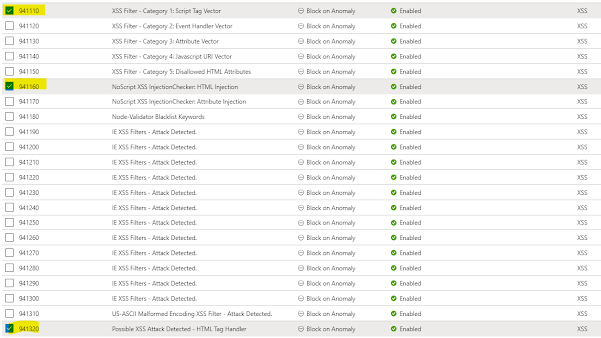
Here are some of the rules that intercepted our malicious request.


Tuesday, September 5, 2023

Designing an active/passive solution using Azure Front Door with priority based traffic routing

Suppose we aim to implement a solution in Azure while ensuring disaster recovery is effectively managed. In such cases, it's often necessary to deploy one instance of the solution as primary and another instance as the standby.

Remember, our objective is not to balance the load but to establish a disaster recovery solution.

The following diagram illustrates how to implement both load balancing and disaster recovery.


We can utilize Azure Front Door to implement the active/standby topology that we are interested in. Azure Front Door enables traffic routing based on latency, priority, round robin, and weighted round robin.

By employing priority-based traffic routing, we can establish an active/standby topology, which is ideal for disaster recovery implementation. According to the provided design, we should assign the same priority (e.g., 1) in the load balancing solution and a different priority (e.g., 2) for the disaster recovery solution.


To achieve this, you need to update the route you are interested in. You can apply a priority by changing the origin (represents an application server) of an origin group (represents application server collection/farm).


That's all you need to do. The secondary origin will receive the traffic when the primary origin is offline.

Tuesday, August 15, 2023

Secure Azure app services behind Azure Front Door using private link

When an Azure App Service is exposed through Azure Front Door, it utilizes the public address and directs the traffic over the public network. However, we can leverage Azure Front Door as the gateway and restrict all public traffic to our origin (Azure App Service app) by utilizing the Private Link integration feature available in Azure Front Door Premium.

Private Link integration enables Front Door to connect with your origin using the Private Link service. This approach eliminates the necessity for your origin to be accessed over the public internet. Instead, it permits Front Door to access the origin using Microsoft's backbone network.


This process establishes the Private Link connection for the origin and necessitates your approval at the origin.


Wednesday, June 16, 2021

Protect your Azure hosted applications with Front Door, WAF and OWASP

You can have your applications hosted in Azure. How can you ensure that they are protected from various attacks?

We are safe if we can use an intelligent Firewall in front of our applications and ensure common attacks are addressed with the guidance of well recognized body, Isn't it.

We can use Azure Front Door and Open Web Application Security Project (OWASP) rules to achieve the above.

Let me explain how to do it.

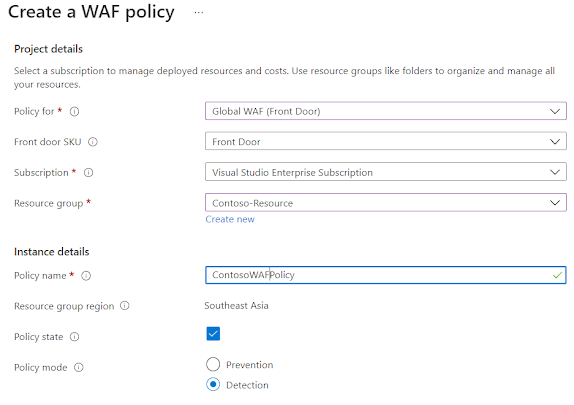
We can implement a custom WAF policy and apply it to frontends in Azure Front Door.

Step 1: Create a WAF policy


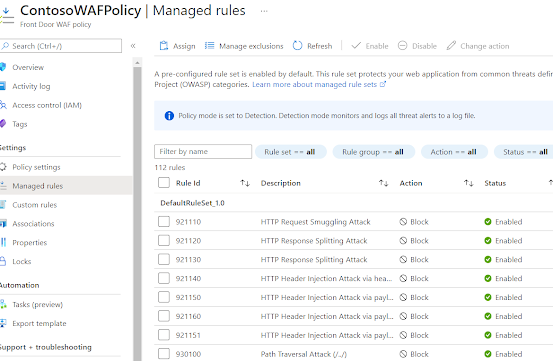
Step 2: Navigate to Manage rules section. OWASP rules are enabled by default. You can disable certain rules if you don't need them


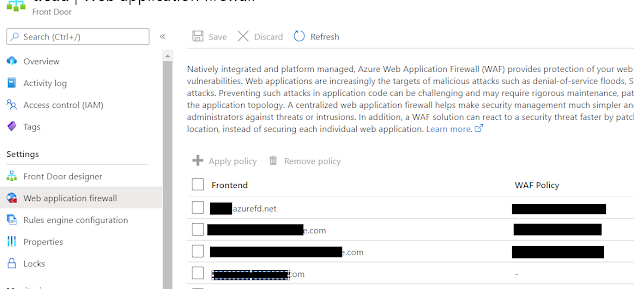
Step 3: You can apply the policy to Frontends in Azure Front Door easily by navigating to Azure Front Door instance


That's it. For any attacks the firewall will provide 403 response now.