Showing posts with label SharePoint Framework. Show all posts

Monday, January 15, 2018

Automate build and release for SharePoint Framework solution

This is the third part of the article series on how to manage SharePoint Framework solution in a team environment

  1. Configure SharePoint Framework solution with Git
  2. Integrate SharePoint Framework solution in to TFS project
  3. Automate build and release for SharePoint Framework solution

In this blog post I’ll explain how to automate build and release process for SharePoint Framework solutions. This uses ALM API which was released recently.

Configure Solution

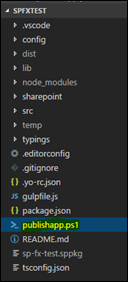
Add following script to the root of the solution. This script will retract if previous version of the solution already exists. Then it will add the solution to App Catalog site and then to the SharePoint site that you wish your customization to be published.

Param(

[string]$username,

[string]$password

)

$packagePath = ".\release\sharepoint\solution\sp-fx-test.sppkg"

$encpassword = convertto-securestring -String $password -AsPlainText -Force

$cred = new-object -typename System.Management.Automation.PSCredential -argumentlist $username, $encpassword

Connect-PnPOnline -Url "https://dinushaonline.sharepoint.com/sites/dev" -Credentials $cred

$appExist = Get-PnPApp | ? { $_.Title -eq 'SPFxTest' }

if ($appExist -ne $null) { 

Uninstall-PnPApp -Identity $appExist.Id

Unpublish-PnPApp -Identity $appExist.Id

Remove-PnPApp -Identity $appExist.Id

}

Add-PnPApp -Path $packagePath -Publish -Overwrite

$appAfterAdd = Get-PnPApp | ? { $_.Title -eq 'SPFxTest' }

Publish-PnPApp -Identity $appAfterAdd.id

Install-PnPApp -Identity $appAfterAdd.id
image

Configure Build

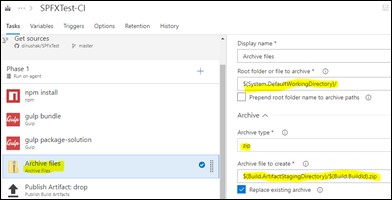
Create a new build definition in your TFS Online environment to perform continuous integration

image

image

We have to perform npm install, gulp bundle, ship and archive steps in following steps

image

image

image

image

image

image

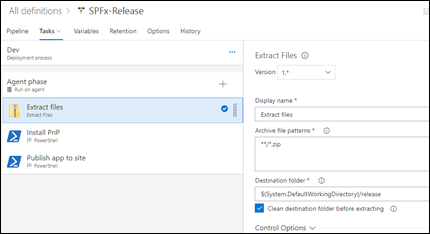
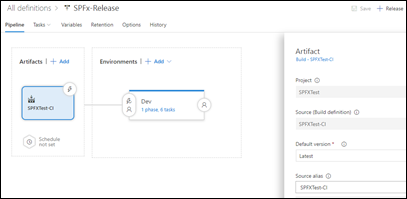
Configure Release

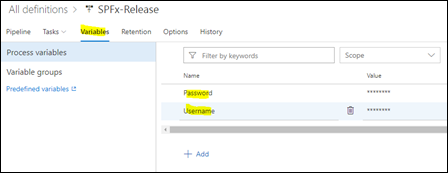
Create variables for SharePoint online username and password which will be used in publishapp.ps1 script
image

image

image

image

image

image

Enable Continuous Deployment

This step will be used to automatically trigger a release as soon as a build is succeeded

image

Friday, December 15, 2017

SharePoint framework– “Syntax error: Unexpected token = ” for Yeoman SharePoint Generator

When I executed “yo @microsoft/sharepoint” to generate a SharePoint extension, I got following error message

image

Attempt - 01

First I tried to uninstall and install SharePoint Framework Yeoman generator by executing following command

npm uninstall -g generator-@microsoft/generator-sharepoint

npm install -g @microsoft/generator-sharepoint

This could not resolve the issue

Attempt - 02

Tried uninstalling and installing both Gulp and Yeoman using following commands

npm uninstall -g gulp

npm uninstall –g yeoman

npm install -g yo gulp

Still the issue persisted

Attempt – 03 (Success!!)

  • Uninstall Gulp and yeoman

npm uninstall -g gulp

npm uninstall –g yeoman

  • Uninstall NodeJs
  • Install NodeJS v6.11.5
  • Install Gulp and Yeoman

npm install -g yo gulp

  • Install Yeoman generator

npm install -g @microsoft/generator-sharepoint

That’s it.

Friday, August 4, 2017

Integrate SharePoint Framework solution in to TFS project

This is the second part of the article series on how to manage SharePoint Framework solution in a team environment

  1. Configure SharePoint Framework solution with Git
  2. Integrate SharePoint Framework solution in to TFS project
  3. Automate build and release for SharePoint Framework solution

In this article I will show how to integrate our SharePoint Framework solution in to a TFS project.

Why do we need a separate TFS project? Can’t we manage all within our Git repository?

Following are key benefits

  • We will get a bunch of project management features like team management, task management, etc.
  • Allow the project to be inline with a specific methodology (e.g Agile).
  • Assist build and release management

Following is a walkthrough on how to integrate our Git repository into a TFS Online project

1. Create a project in TFS online

image

2. Import our Git repository

image

image

image

Wednesday, July 19, 2017

Configure SharePoint Framework solution with Git

The most popular code editor to build SharePoint Framework solutions is Visual Studio Code. But software developers who are used to Visual Studio might find it bit challenging at times.

How can we use SPFx solutions in a team environment?

This problem was raised in a recent meetup and I thought of writing a walk through

This article is the first of an article series

  1. Configure SharePoint Framework solution with Git
  2. Integrate SharePoint Framework solution in to TFS project
  3. Automate build and release for SharePoint Framework solution

This blog post will cover the first part of the series. I’ll illustrate how to integrate our SharePoint framework project with Git

1. Configure Git repository

image

image

2. Create a folder and open Visual Studio Code

image

3. Clone the repository we have just created

image

image

4. Use Yeoman SharePoint generator to populate the structure

image

image

image

5. Commit changes

image

6. Publish changes to repository

image

image

Wednesday, August 17, 2016

Collab365 - SharePoint Framework the future of SharePoint development

The largest online conference for SharePoint, Office365 and Azure is just around the corner. I will be speaking on the topic of “SharePoint Framework the future of SharePoint development

600x200_speakerbadge_GC

You can register by navigation to this site

SharePoint Framework

SharePoint Framework, a page and part model that enables fully supported client-side development, easy integration with the Microsoft Graph and support for open source tooling. This will be the trend for any SharePoint customization. In this session I will describe the SharePoint framework and walkthrough a practicel sample which uses AngularJS and Kendo UI. Furthermore I will talk about the approach we take to migrate current SharePoint solutions to the SharePoint Framework

In this session I will try to talk about the following

  • SharePoint Framework in general
  • Advantages of SharePoint Framework
  • How to migrate current projects
  • SharePoint Framework with AngularJS
  • SharePoint Framework with Kendo UI
  • Client side / OpenSource tooling
  • New solution deployment and release mangement
  • Demonstrations