Showing posts with label Data Explorer. Show all posts

Thursday, December 21, 2023

Simulating Azure event hubs functionality end to end with Azure Data Explorer and generate data feature

To evaluate Azure Event Hubs functionality, typically we need to develop an application for data ingestion and another for data consumption

In my previous blog post, I outlined the process of discovering ingested data in Event Hubs using Azure Data Explorer. In this article, I will demonstrate how to ingest data into Event Hubs without writing a single line of code.

Our first step is to navigate to the Event Hubs instance and access the Generate data (preview) feature.


Multiple options are provided to ingest payload either from pre-canned datasets or custom payloads based on a given schema.


Once you click on the send button, the data will be ingested to our even hub instance.

Then, you can easily discover this data in your pre-configured Azure Data Explorer. I have detailed the steps involved in configuring Azure Data Explorer in my previous blog post.


This approach allows you to explore the functionality of Event Hubs without writing any code!

Tuesday, December 12, 2023

Visualizing ingested events in Azure Event Hub with Azure Data Explorer

In modern cloud-based solutions, event-driven architectures are very common. Microsoft Azure facilitates event processing through Azure Event Hubs, offering essential building blocks to implement scalable solutions capable of processing large volumes of events and data with low latency and high reliability.

Debugging or testing event-based solutions can be challenging due to the nature of their architecture. It requires implementing ingesting applications and consumers to verify the functionality of event-based solutions.

In this article, I will demonstrate how to leverage Azure Data Explorer to visualize ingested data without any delay. With this solution, there is no need to create any custom solutions to view the contents of our Event Hub instance.

First, we need to create our Azure Data Explorer cluster.


Next, we will create a database in Data Explorer.


To connect Data Explorer with Event Hubs, let's enable a managed account at the Data Explorer instance.


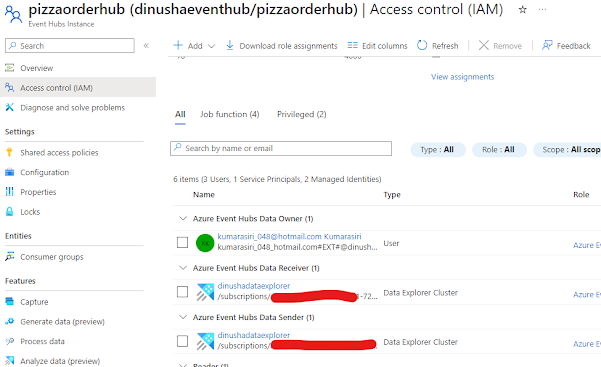
After enabling the managed account at the Data Explorer instance, we need to assign the required permissions to the Event Hub.


Now, let's configure Data Explorer for our Event Hub. Navigate to the Event Hub and select the "Analyze data" option.


Let's link our Data Explorer instance


Now that our configuration is complete, let's ingest some data and explore it in Data Explorer.

To explore our data, navigate to Data Explorer and go to the Query section. Then, select the table and run your query to explore the ingested data.


Thursday, September 14, 2023

Resolve Azure Data Explorer error - Principal 'aaduser=xxx' is not authorized to perform operation 'VersionShowCommand'

When provisioning a new Azure Data Explorer cluster and navigating to the query section, you may receive an error message stating that the principal 'aaduser=xxx' is not authorized to perform the operation 'VersionShowCommand'.


To resolve the issue, you must grant the necessary permissions to the user principal referenced in the error message.

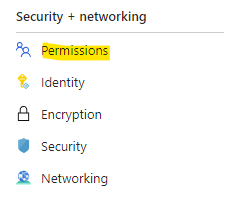
Begin by navigating to the Security + Networking section and selecting the Permissions menu.


Then, choose either AllDatabasesAdmin or AllDatabasesViewer based on your specific requirements.


Next, assign the user principal mentioned in the error message to grant the desired permission.


That's all you need to do. Now you can access the cluster