Tuesday, November 30, 2021

Posting data to Azure Function using HTTP trigger with .NET 6

Serverless computing was out there for a long time. Microsoft Azure had adapted the concept with Azure Functions, Logic Apps and Event Grids.

We can use Azure Functions for event driven workloads with short lived processes. That means there should be a trigger that will initiate the function. For an example,

  • Blog is added to your container
  • Timer tick
  • New item added to queue
  • HTTP request
  • etc..

This is the first post of a serious of articles on Azure Functions/Durable functions.

In this post I'll guide how to respond to HTTP post request with an Azure Function. 

By the way shouldn't I be using a RESTful Web API in Azure Web App instead of Azure Function?

That can also be an option. But let's think about it's usage. If we have a small and well defined and short lived component, what's the harm of using a function. And I'll extend this article into another blog post to illustrate some cool features Azure Functions can bring to the table.

Let's start the journey

Step 1: Create Azure Function App in Azure portal. I use .Net as the runtime and 6 as the version


Step 2: Open the VSCode in your directory and install following extensions if you had not already installed


Step 3: Let's navigate to Azure section and login to your subscription. Then click on the Azure Function App we just created. You can see the Function App


Step 4: Let's add our first Function there. Press F1 key and select Azure Functions: Create Function option


Step 5: This is the generated code with the scaffolding


namespace Company.Function
{
    public static class CustomerTrigger
    {
        [FunctionName("CustomerTrigger")]
        public static async Task Run(
            [HttpTrigger(AuthorizationLevel.Function, "get", "post", Route = null)] HttpRequest req,
            ILogger log)
        {
            log.LogInformation("C# HTTP trigger function processed a request.");

            string name = req.Query["name"];

            string requestBody = await new StreamReader(req.Body).ReadToEndAsync();
            dynamic data = JsonConvert.DeserializeObject(requestBody);
            name = name ?? data?.name;

            string responseMessage = string.IsNullOrEmpty(name)
                ? "This HTTP triggered function executed successfully. Pass a name in the query string or in the request body for a personalized response."
                : $"Hello, {name}. This HTTP triggered function executed successfully.";

            return new OkObjectResult(responseMessage);
        }
    }
}

Step 6: Let's add another class called Customer


Step 7: Let's modify the Function a bit now


public static class CustomerTrigger
{
        [FunctionName("CustomerTrigger")]
        public static async Task Run(
            [HttpTrigger(AuthorizationLevel.Function, "get", "post", Route = null)] HttpRequest req,
            ILogger log)
        {

            string requestBody = await new StreamReader(req.Body).ReadToEndAsync();
            Customer customer = JsonConvert.DeserializeObject(requestBody);


            return new OkObjectResult(customer.name);
        }
}

Step 8: Let's deploy the function to our Function App


Step 9: Great!! our function is deployed now. Let's get the URL


Step 10: Let's try this with Postman


Great!! Our sample is working perfectly !!

Thursday, November 25, 2021

Resolve error: Creation of System Topic has failed with error: The subscription is not registered to use namespace 'Microsoft.EventGrid'. See https://aka.ms/rps-not-found for how to register subscriptions. Event Subscription will not be created.

Recently I got the above error when creating an Event Grid subscription


Following are the steps I used to resolve the error

Using Azure Cloud Shell execute following commands

  • az account set --subscription "Visual Studio Enterprise Subscription"
  • az provider register --namespace Microsoft.EventGrid
  • az provider show -n Microsoft.EventGrid
This will register the provider in your subscription.

This format is applicable for registering any service providers in your subscription

Monday, November 15, 2021

Azure Application Insights - Smart Detection - Identify suspicious user activity

Now we can detect suspicious user activity using Azure Application Insights.

You need to navigate to Application Insights and click on Smart Detection. It will show potential security and performance issues.


We can click on the Suspicious user activity detected (preview) card to obtain more information on the issue. 

Then click on the Suspicious user activity link.


It'll show malicious users who accessed the system from multiple locations at the same time.


If we want we can construct an Alert Rule to notify an authority at a particular time


Furthermore we can see all requests from malicious users. For that you need to click on All requests from the most suspicious user link


You can modify the value for user_AuthenticatedId parameter to see what other users had accessed

Tuesday, October 19, 2021

Resolve - Microsoft 365 Compliance - Sorry we couldn't update your organizational settings. Please try again

When I navigated to Microsoft 365 compliance center to enable audit I encountered following error


Seems that there is a throttling enabled. I waited few minutes and it was successful after few attempts. I didn't need to do anything extra.


Tuesday, October 12, 2021

Azure Advisor : Your assistant in Cloud

You can have multiple workloads in your cloud. When time goes on you might find it difficult to manually check each and every resource. Most of the time Cloud housekeeping is neglected.

May be your resources are not provisioned with the best practices. Or may be you have security vulnerabilities. Furthermore your resources are not right sized, causing your cost to go up.

Azure Advisor is the centralized service which scans each and every workload and recommend you with best practices to optimize.


You get recommendations on following categories

  • Cost
  • Security
  • Reliability
  • Operational excellence
  • Performance
We will check few examples from each section

Let's first check on Cost section

As you can see I have two high impact recommendations


Let's first check the quick fix


This VM is not being used at all. We can shut down the VM and reduce our cost.

Let's check Security section

We have multiple security vulnerabilities there


Let's see Reliability findings

It'll show the improvements I can introduce to improve the reliability


Let's find out performance suggestions

Following are some suggestions


Wednesday, September 8, 2021

Azure Privileged Identity Management (PIM) to grant Just in Time (JIT) access to resources

We always want to follow the least privilege security principle when granting permissions. Is role based access control alone sufficient to achieve this?

There are several challenges

  • If permission given indefinitely without an expiry, it will cause a risk
    • Such users may leave the organization
    • Projects may end
  • Having higher permission without a need at the moment is also a risk
    • Credentials can be compromised at any moment
    • You may do mistakes with higher permissions
Privileged Identity Management (PIM) is the solution for this. Microsoft Azure also provides a PIM facility which is an Azure AD premium (P2) feature. This article will provide an overview of Azure PIM features.

Azure PIM allows you to grant users and groups elevated privileges to Azure AD and Azure resources whenever necessary.

We will take a scenario to explain the concept.

Lat's take Contoso, which is a Financial organization which has its workloads in Microsoft Azure. John is a systems engineer who works in the same organization. Time to time the business requires to build new VM workloads and to modify existing VM resources. John should not have permanent contribute access due to prevailing audit and compliance requirements. What would be the solution?

What we can do is to use PIM, and assign John as eligible for VM Contribute role. As per this solution John will not have permanent access to the resource. Whenever he needs the access, John would navigate to PIM console and requests for the desired access. He might be asked to provide a strong authentication (MFA) and approval might also be required. After the granted time window is elapsed his elevated privilege will be revoked.

Existing privileges

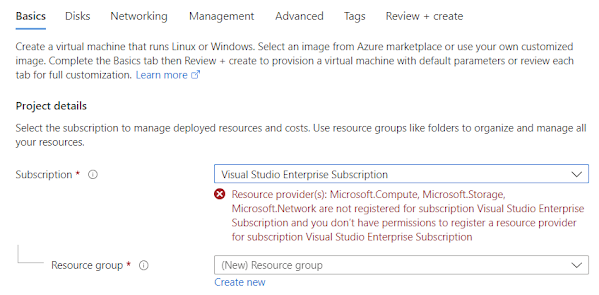
Currently John has read permission to the subscription. When he navigate to create a VM he will get following error message


Steps to gain Just in Time (JIT) privileges to perform desired actions

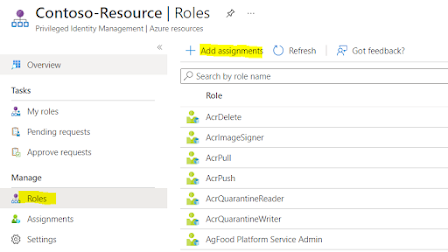
Step 1 : Administrator would log into  PIM and click on Azure Resources


Step 2 : Click on Roles and click on add assignments


Step 3 : Select the role and select the user


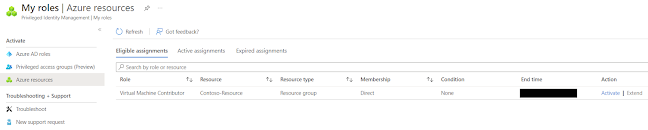
Let's login to the PIM as John.

Step 1 : Navigate to My roles and Azure resources


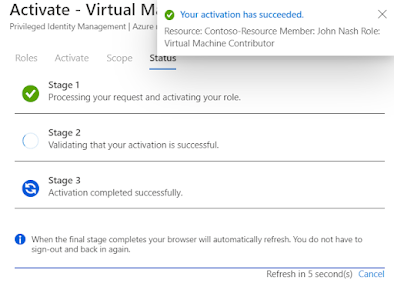
Step 2 : John will activate the privilege for 1 hour


Step 3 : Navigate to Active assignments in Azure resources blade in PIM


Now John should have access to VM resources, Let's see whether if he can create a VM.


Great!! Now we don't get the previous error. John's access will be revoked automatically after the expiry date or he can manually deactivate the elevated access.

Thursday, August 5, 2021

Application Insights - Transaction trend over time and analyze further

This article is related to the previous one I wrote about Application Insights - Investigate performance

From the previous article, I explained how to investigate performance of a specific operation and monitor end-to-end transaction. I will continue where I stopped and I will use the same operation to illustrate.

In order to access the trend of specific request over the time, need to click on following link


It will load events chart as below. In order to properly identify a pattern I will select last 48 hours history. You can observe that there is a peak starting from 1.30PM and gradually reducing everyday


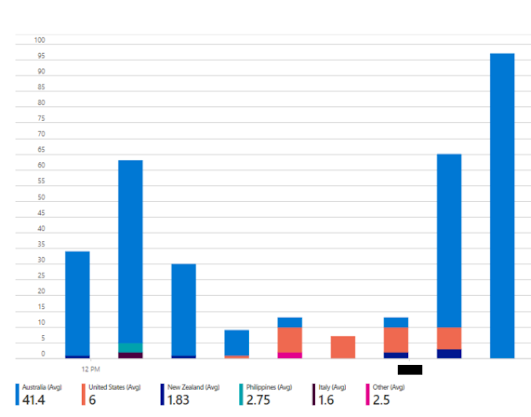
We can further analyze the same chart by splitting each bar with other parameters. As an example I use Performance parameter to split bars.


I'll Zoom into a specific area. You can see there are some calls which took around 1-3 seconds (Shown in green color) 


I will split bars with another parameter. This time I'll use Country or Region