In this article I'll introduce Well-architected framework, Azure advisor and Advisor score. More importantly I'll illustrate how they are interconnected and how can we use them together to achieve cloud excellence.
Azure well-architected framework
Microsoft Azure has a large collection of features categorized into IaaS, PaaS and SaaS. It is very difficult for us to gain expertise on each workload.
As a solution, Microsoft has introduced the well-architected framework which guides us on implementing Azure services with best practices. Furthermore, it assists us on operating and governing services those are already implemented in our tenant.
The Well-architected framework is built with five pillars. When implementing or operating Azure services we should always consult following pillars. The detailed documentation is available here
1. Cost optimization
Most of the cloud offerings are delivered as pay-as-you-go modal. So we need to be very careful on picking right workloads as you need to select the most cost effective solution. Furthermore when and where to use our resources. Some guidelines are given below
- Pick correct resources
- Setup budgets and cost constraints (limits)
- Allocate and deallocate resources when necessary
- Continuously monitor resources
- Optimize or scale based on usage
2. Performance efficiency
This is discusses how can your workloads meet varying demands in an efficient way. You should consider about
- Design patterns (e.g. CQRS, Event Sourcing, Sharding, etc..)
- Best practices (Autoscaling, Background Jobs, Caching, CDN, Data partitioning)
- Design your landing zones/resources for failure
- Design for self-healing
- Design for scale-out
- Continuously monitor application health
- Design patterns for resiliency
- Best practices
- What identity to use to protect your resources
- Application security
- Data sovereignty and encryption
- Usage of patterns ( e.g. Ambassador, Anti-Corruption layer etc..)
- Continuously monitor health
- Continuously monitor availability
- Continuously monitor performance
- Continuously monitor security
- Continuously monitor SLA
- Continuously monitor usage and audit
Azure advisor
Azure advisor is your personal assistant in the cloud.
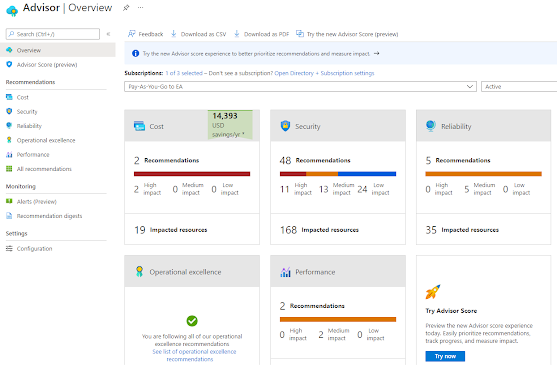
It provides you with recommendations and corrective actions improve your cloud workloads. It provides feedback on following areas
- Cost
- Security
- Reliability
- Operational excellence
- Performance
Advisor score
Azure advisor score is the consolidated figure calculated based on your progress towards achieving the excellence in your cloud.
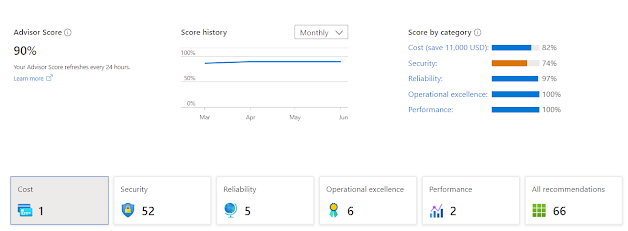
You can have the current score as the baseline and set an improved figure as the target. Then you can follow recommended actions to achieve the target score,
Summary
Well-architected framework is a great tool to achieve the excellence in Azure cloud. You don't need to reinvent the wheel.
You can use Azure advisor and advisor score to keep your tenant complied with the well-architected framework.


